


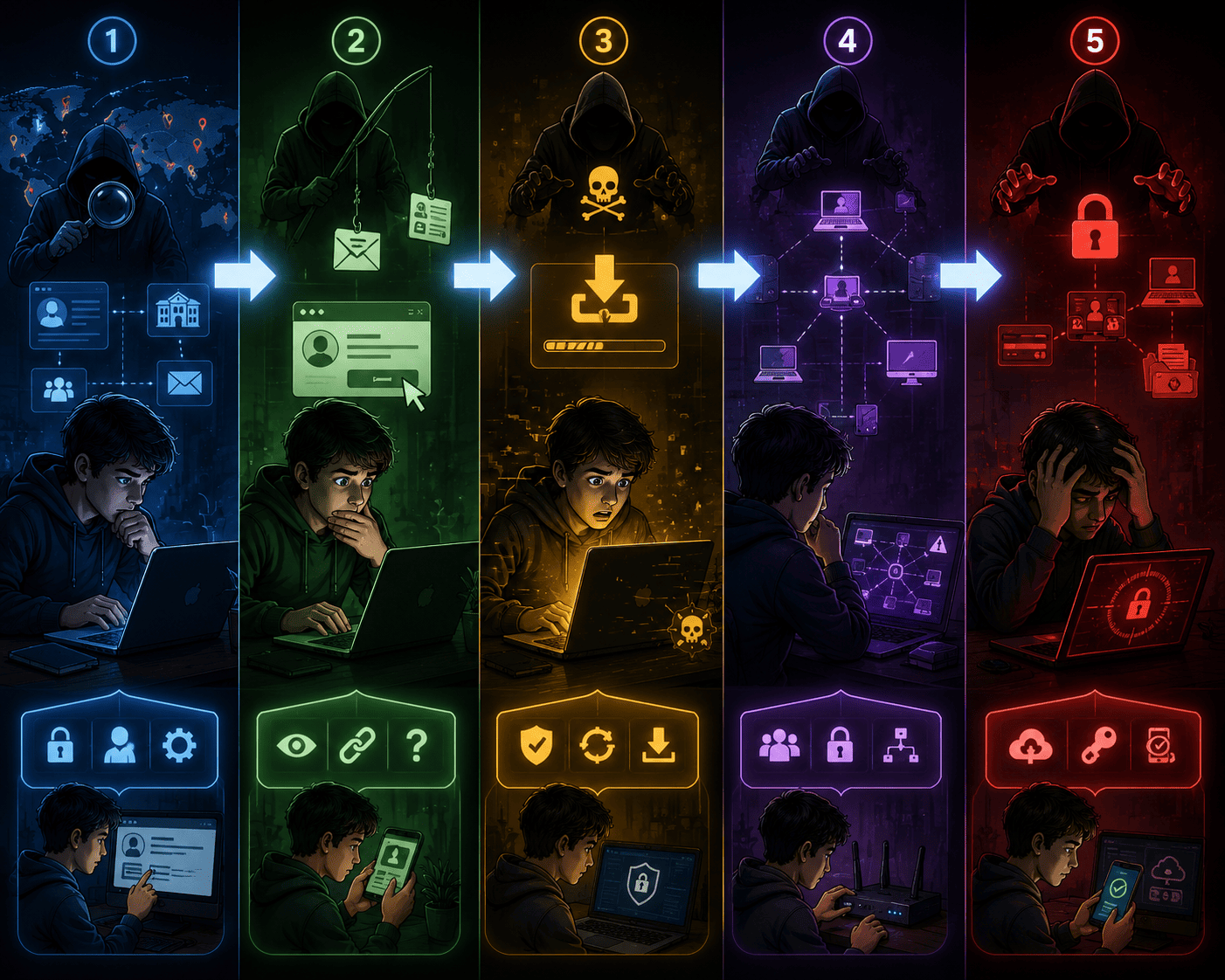
From the first careless click to total damage — and how to cut the attack before it turns into a disaster.
A hacker attack doesn’t start with flashy code or movie scenes.
In real life, it starts quietly: a harmless-looking message, a rushed click, an unprotected network.
Cyberattacks follow clear, structured stages.
If you understand those stages, you know exactly where to defend yourself.
Below is a real-world breakdown of how attacks work — and how to stop them.
Phase 1 — Reconnaissance (Recon)
What the attacker does
Before attacking, the hacker watches. They collect publicly available information to understand their target.
This can include:
- Scanning social media profiles
- Finding emails, phone numbers, school or workplace names
- Observing habits, routines, and online behavior
- Searching for exposed files or leaked data
Real example
An attacker finds a school coordinator’s full name and email on LinkedIn.
They then send a fake email pretending to be from the Department of Education.
How to defend yourself
- Limit what personal information you share publicly
- Be careful with posts that reveal names, locations, schedules, or school details
- Use privacy settings on social media
- Never reuse the same password across multiple accounts
Phase 2 — Engagement (Social Engineering)
What the attacker does
Now the hacker makes contact. Instead of breaking systems, they manipulate people.
Common tactics:
- Fake emails with links or attachments
- Messages via WhatsApp, Instagram DMs, or SMS
- Urgent, emotional, or highly technical language to pressure you
Real example
“Your Google Classroom access has been suspended. Click here to restore it.”
The link leads to a fake page. The victim enters their login.
Account compromised.
How to defend yourself
- Be suspicious of messages that create urgency or fear
- Check the sender and hover over links before clicking
- Never share verification codes
- Confirm unusual requests through another channel
Phase 3 — Infection (System Entry)
What the attacker does
Once the victim clicks, malware enters the system.
This may include:
- Viruses, trojans, spyware, or keyloggers
- Backdoors that allow silent remote access
- Monitoring activity without visible signs
Real example
You open a file named “Final_Grades_3B.pdf”.
Nothing happens on screen — but a keylogger is now recording everything you type.
How to defend yourself
- Never download files from unknown or unexpected sources
- Use a trusted, updated antivirus
- Keep your operating system and apps fully updated
- Disable automatic execution of USB drives and executable files
Phase 4 — Lateral Movement
What the attacker does
After gaining access, the attacker spreads inside the network.
They may:
- Access connected accounts and shared folders
- Move between devices on the same network
- Escalate privileges to reach more critical systems
Real example
One computer in a school network gets infected.
Within minutes, the malware spreads to labs and servers, encrypting administrative data.
How to defend yourself
- Use limited user accounts (not admin by default)
- Never share passwords
- Segment networks (for example, student labs separate from administration)
- Monitor for unusual network behavior
Phase 5 — Impact (Final Action)
What the attacker does
This is where real damage happens:
- Files are deleted or encrypted
- Personal data is stolen
- Accounts are used to scam others
- Ransomware demands payment
Real example
A student clicks a phishing link.
Their Instagram account is taken over.
The attacker messages friends asking for money.
Within minutes, multiple people fall for it.
How to defend yourself
- Enable two-factor authentication (2FA) on all accounts
- Keep backups of important files
- Know what to do if an account is compromised
- Alert contacts immediately if your account is hijacked
Quick Summary — Attack vs Defense
Reconnaissance
Attacker: Collects public information
Defense: Reduce exposure, protect personal data
Engagement
Attacker: Sends deceptive messages
Defense: Verify, question, don’t click blindly
Infection
Attacker: Installs malware
Defense: Antivirus, updates, file caution
Lateral Movement
Attacker: Spreads inside the network
Defense: Limited access, segmentation, monitoring
Impact
Attacker: Steals, locks, or destroys data
Defense: Backups, 2FA, fast response
Final Thought
A hacker attack doesn’t happen instantly.
It’s built step by step — through distraction, pressure, and misplaced trust.
But every phase is also a chance to stop it.
You don’t need to be an expert.
You just need to recognize the signs, slow down, and act smart.
Guardians’ Rule:
Hackers win when people are distracted.
Guardians win when they stay alert.
Save this.
Share it with your class.
And remember: the strongest security tool is your awareness.


Deixe uma resposta